
A recruitment agency website needs to serve two audiences: people looking for work and employers looking for staff. Before choosing a design, decide what each visitor should be able to do and how your team will handle the information they send.
For an agency in Tipperary, that might mean a simple candidate registration route and an employer enquiry form. A searchable vacancy section may also be useful, provided someone can keep it current. The right scope depends on how your agency works.
Use straightforward navigation labels such as “Job seekers” and “Employers”. Each route should explain who you help, the sectors you cover and the next step. Make phone and email details easy to find for visitors who would rather speak to someone.
Describe your actual coverage. A Cashel office serving clients across Ireland should make both facts clear. Town and sector information should help visitors understand your service, rather than repeat place names without useful detail.
A job board is a separate requirement from a form that lets candidates register their interest. If you plan to publish vacancies, prepare a consistent format for each role:
Decide who publishes each vacancy and removes or updates it when circumstances change. If your recruitment software already holds this information, discuss whether the website will link to it, display a feed or need a separate integration. Have the connection checked and quoted before assuming it is included.
Distinguish applying for a specific role from sending a CV for future opportunities. A role application should carry the vacancy reference through to your team. A general registration page should explain what happens next without promising a suitable opening or a response time you cannot maintain.
Agree the information your team needs and how it will receive submissions. For CV uploads, specify supported file types and size limits in advance, then show those instructions beside the upload field. Ask your provider to demonstrate the complete route, including the confirmation a candidate sees and where the submission arrives.
An employer page should explain the types of hiring you support and provide a clear way to send a staffing brief. Start with practical details such as the role, work location, employment type and preferred start date, alongside the employer’s contact information.
Keep the first enquiry manageable. Your team can gather a fuller brief afterwards. Agree who receives employer enquiries and who follows them up so the website fits the working process behind it.
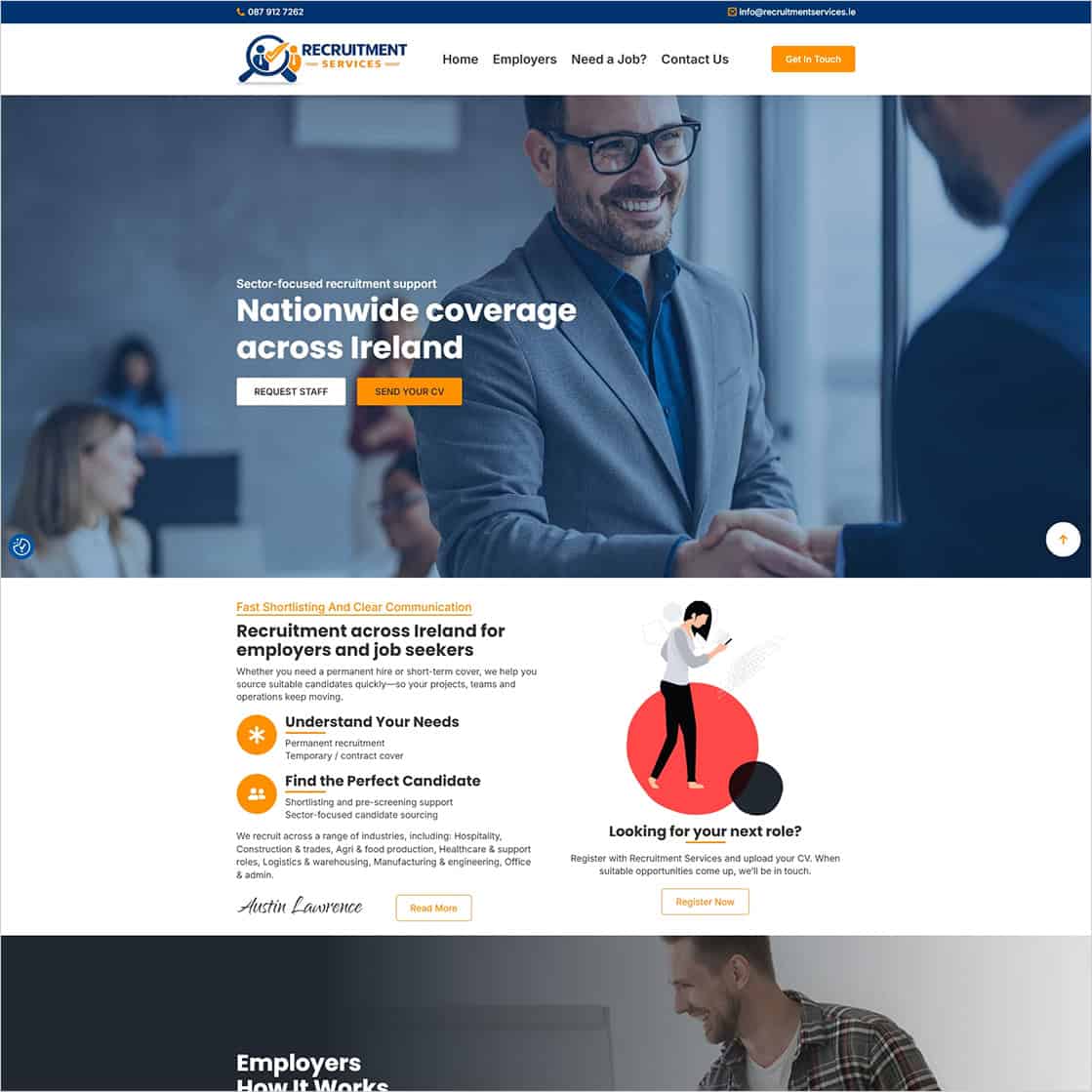
We built the Recruitment Services website for the recruitment provider at 102 Main Street, Cashel, Co. Tipperary. Its public site offers separate “Employers” and “Need a Job?” routes, with prominent options to request staff or send a CV.
The candidate route explains registration and the recruitment process, while the employer route describes how to submit a hiring brief. The site also identifies the sectors it serves and its nationwide coverage across Ireland.
This is a useful starting point for planning an agency website: give each audience a relevant route and explain the next step. Public vacancy listings or connections to recruitment software can be considered separately according to the agency’s needs.
Explore the Recruitment Services website or read our Cashel website launch article for the project background.
Assign responsibility for vacancies, sector information, contact details and staff profiles. Ask for a demonstration of the editing tasks your team expects to handle, including closing a role and checking how its page appears afterwards.
Keep ongoing services clear in the quotation. Our technical website maintenance is billed yearly; content changes, additional pages and SEO work are quoted separately. If you want someone else to publish and maintain vacancies, agree that content service explicitly. Hosting and any recruitment software charges should also be identified separately.
Test the candidate and employer routes on desktop and a phone. Use clearly labelled test details and a dummy CV containing no real candidate information. Confirm that:
If the site has job listings, also check that the application identifies the correct role and that closed vacancies are handled as agreed. Repeat the relevant checks after changes to forms, email delivery or connected recruitment software.
Bring together your audiences, sectors, coverage, application process and any existing software before asking for a quote. Include sample vacancy information if you need listings, and name the person who will keep the content current.
See our WordPress website service for Tipperary businesses or contact Istech to discuss your recruitment agency website. We can help define the pages and features around your agency’s working process.
